Calc4M - the mobile calculator
- Version:
- Last Updated:
- Total Downloads:
- 1.17
- August 28, 2009
- 76,336
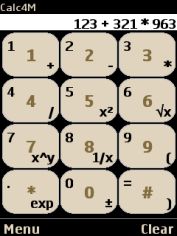
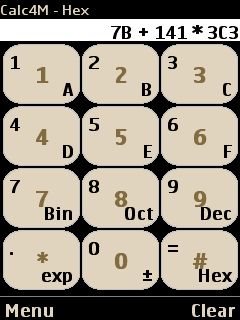
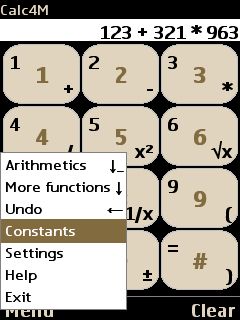
This is a scientific calculator for mobile phones. It is configurable and contains most of the normal functions such as trigonometric and logarithmic functions, conversions, constants, memories and binary, octal and hexadecimal notation.
If fully supports both touch screen and non touch screen models, you may use the buttons, if you have a touch screen you may also click on the screen. It automatically adapts to the screen size and phone model standards.
It is easy but still fast to use and with lot of functionality. One important thing to note is that most buttons have two functions. Press and hold down the key to access the "secondary" function.
The following settings are configurable
- display a welcome screen or not
- display the call stack or not
- automatically return to the basic arithmetic screen or not
- use full screen mode or not
- use nice looking button texts or "safe" texts that works in any mobile
- two different keyboard layouts
- calculation font size
- default number format (sci/eng/default)
- type of "long button press" notification
For more screendumps of the calculator, see http://www.hellebo.com/Calc4M.html
For the calculations, the library ral.Real is used, see http://real-java.sourceforge.net/Real.html
Changes for version 1.17
- Changed so it uses CLDC 1.0 instead of CLDC 1.1 (may work on older phones)
Changes for version 1.16
- Added possibility to define how many decimals to display (in settings menu)
- Changed so that the "fire" button now performs the calculation ("=")
Changes for version 1.15
- The conversion between miles per gallon and liter per 100 km was wrong by a factor 10. Thanks to Nuno Gil for notifying me.
Changes for version 1.14
- Made the #-button work properly on newer Nokia S60 (thanks to Peter Frank for making me aware of this and to Odne Hellebø for letting me try it on his new phone)
- Added functionality to touch screenphones, drawing left on the screen now is the same as pressing the left button, the same for up, right and down. To perform an "all clear", draw a slanting line on the screen
- Changed horsepower conversion so it now states it is metric horsepower, hp(M). Thanks to EgĂdio Campos for pointing this out
- Made the start screen display only the first time after a fresh installation
Changes for version 1.12
- Made the menu accessible for Motorola ROKR E6 (thanks to Jaap Geurts for helping me with this)
- Fixed a bug that allowed typing 8 when in octal mode
Changes for version 1.11
- Added octal numbers
- Fixed a bug that occurred using the conversions in some special cases
- Made it work better on old Samsung phones such as E250
Changes for version 1.9
- Made it work better on BlackBerry
Changes for version 1.8
- Made the menu look nice on Nokia S60
Changes for version 1.7
- Added some conversions
Changes for version 1.6
- Added possibility to click on the touch screen on touch screen mobile phones
- Added an "undo" function that lets the user regret input
- Changed how to get to the different modes (now only up/down)
Changes for version 1.5
- Made it work correctly on Samsung mobile phones, appearantly it did not previously. Thanks to Jorge Centellas Ayala for pointing this out
- Added a special button text mode for Nokia phones
- Updated the vendor recognition function
Changes for version 1.4
- Fixed a bug that occurred when performing some conversions without specifying a value
- Removed the MIDP 1.0 version from here since it only confused potential users. If you need a MIDP 1.0 version, please download from http://www.hellebo.com/Calc4M.html
Changes for version 1.3
- Removed leading zeros when using binary and hexadecimal notation
Changes for version 1.2
- updated constants handling on the MIDP 1.0 version
Changes for version 1.1
- updated default default/sci/eng handling
- added a MIDP 1.0 version